Welcome!
We are so glad you joined us.
ILGISA Forums
A place for Illinois GIS professionals to connect and collaborate.
Here are some things you can do to get started:
 Introduce yourself by adding your picture and information about yourself and your interests to your profile. What is one thing you’d like to be asked about?
 Get to know the community by browsing discussions that are already happening here. When you find a post interesting, informative, or entertaining, use the
  to show your appreciation or support!
 Contribute by commenting, sharing your own perspective, asking questions, or offering feedback in the discussion. Before replying or starting new topics, please review the Community Guidelines.
 Take us with you by downloading Discourse Hub app for Android or iOS!
 Make it your own by adjusting your interface settings. Prefer different colors? Want larger font sizes? You can change it!
If you need help or have a suggestion, feel free to ask in Site Feedback or contact the admins.
That’s great, but how does this thing even work?
Need a bit more of an introduction? Let’s dive in.
Organization
Discourse is a forum, and so it revolves around topics. A topic is a “post” on the forum. Each topic is something that you can open up and reply to with comments, questions, and the like. You’re in a topic right now, reading this!
Topics are organized in two ways:
Categories
Each topic belongs to a single category. The categories mostly exist to keep things organized. This is a question, this is an announcement, this is a casual conversation. That sort of thing.
Categories can also be used to control access. The Board and Committees category, for instance, can be seen by anyone, but only board and committee members can actually post there.
Tags
A topic can be assigned multiple different tags. These are more free-form, and are separate from categories. You might, for instance, want to look for any posts relating to openstreetmap, regardless of the category the post falls in.
Tags are optional, but can help users contextualize content and make things easier to find.
Interface

Categories
When you log in, the default landing page shows you the Category page. On the left, you’ll see the different categories of the forum. To the right, a list of the latest posts.
Latest
As the name suggests, this tab will list off all the topics on the forum, with the most recently active posts at the top.
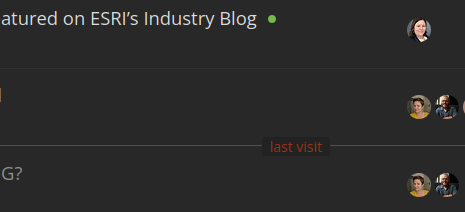
It even includes a little “last visit” line to show you what’s changed since the last time you were on the forum.
Hot
This tab sorts topics not simply by recent activity, but the level of activity. Number of views, replies, etc., not simply the newest posts.
Sidebar
The sidebar at the left has a bunch of links and shortcuts. Some go to specific pages / menus, others are just shortcuts to specific categories or tags. You’re allowed to customize your sidebar, too!
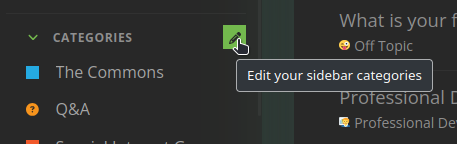
Click the pencil, and you can decide which links, categories, or tags show up in your menu.
Inbox
Every user has their own inbox for direct messages between other users or groups. Messages work just like regular posts, but instead of going into a category, they are only visible to the people you message.
Messaging a Group
Some groups, like the Board of Directors and the various committees, have their own inboxes. A member of one of those groups would see a separate inbox in these cases.

For regular members, you can make use of this feature by sending a message to the group itself, rather than to specific users. Have a question for the board? Want to join a committee? Send them a message!
What can I do? What should I do?
Post!
As a regular member, you are allowed and encouraged to create new topics. Look for the “new topic” button in the upper-right:

Try to find the right category for your post, but don’t sweat it; we can always move a post to its rightful home later on.
Not sure where to post? Add it to The Commons.
Specific channels to check out
Reply!
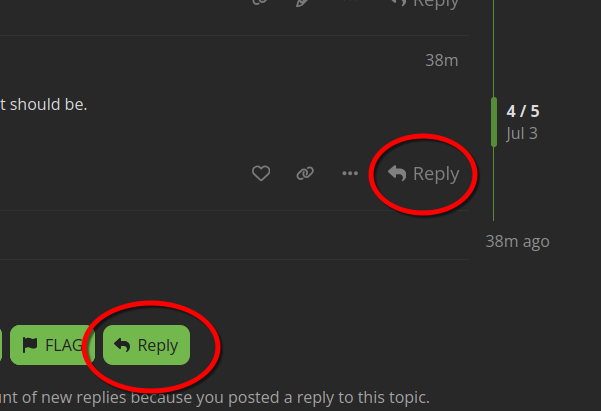
Check out the posts already out there. You can reply to the whole topic, to contribute to the overall discussion, or you can reply to a specific post in the topic to more directly address something.
Take the tour!
You might have gotten a message from @discobot when you joined. Go ahead and follow the prompts in that message, and discobot will give you an interactive tour of some more particulars about authoring posts and more. It’s worth your time!
Ask for forgiveness, not permission
Click things, write stuff. We have a helpful team of mods, and we’ve put up a few guardrails, but this is meant to be a forum in the traditional sense: a space where folks can come together and communicate freely.
We’ve got our guidelines for basic conduct, and we will let you know if you cross any lines. Lurk and read if you like, but it’ll be more fun for everyone if you get out there and post!